Save, reopen, or recover a project
Keep an editable Arc file and recover recent changes from the same browser.
Save and reopen a project file
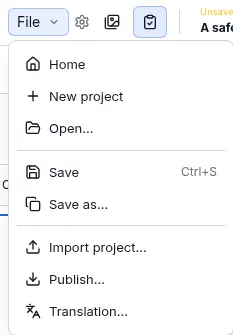
- Choose File → Save as… and choose a place for the
.arivvofile. If the browser downloads the file, move it to the folder where you want to keep your work. - Use File → Save for later changes. If your browser cannot write back to the chosen file, Arc offers to save another copy. Keep track of which copy is current.
- To reopen your course, choose File → Open… and pick the project file or a matching entry under recent projects. Arc also accepts older
.slideforgeproject files.
Recover unsaved edits

If the launch page says Unsaved work found, choose Restore to reopen the draft and review its contents. Then save to a project file.
You can also look for the draft under File → Open… from the same browser profile and Arc address where you edited it. Browser recovery is tied to that browser and address. Use a saved project file to move the course to another device.